
If your business sends text messages from a regular-looking 10-digit phone number, you must complete 10DLC registration to meet regulations and ensure your messages are delivered. 10DLC stands for “10-digit long code” — a standard-looking number that’s officially approved for business texting in the U.S. Since new rules came into effect in July 2023, all businesses must register their brand and texting campaigns before using a 10DLC number. This guide will explain what 10DLC registration is, why it matters, and how to complete the process so you can send business texts confidently and stay compliant.
What is 10LDC Registration?
10DLC registration is a required process for businesses that send text messages from a standard-looking 10-digit phone number. It verifies your business with mobile carriers so your messages are trusted and not mistaken for spam. To register, your business and messaging campaign details are submitted to The Campaign Registry (TCR), a central system that verifies senders and tracks the purpose of their texts. This system was created to protect consumers from spam, scams, and other unwanted messages.
The process has two main stages:
- Brand Registration: Details such as company name, EIN, website, and contact information are provided to confirm the business identity. This ensures carriers know your business is legitimate.
- Campaign Registration : After brand approval, each messaging campaign you plan to run is registered. You’ll define its purpose (for example, promotions or reminders), include sample texts, and show how recipients agreed to receive your messages.
10DLC Registration Requirements
Before starting your 10DLC registration, you’ll need to have certain details and documents ready. Mobile carriers and The Campaign Registry (TCR) use this information to confirm your identity and understand the purpose of your SMS campaigns.
Here’s what you will need to get started:
- Business Details: This includes your official company name, physical address, and a website or business Facebook page that publicly represents your organization.
- Tax Identification: Tax ID or Employer Identification Number (EIN) will be used to confirm your business identity during the brand verification stage.
- Primary Contact Information: An email address and phone number for the person responsible for managing your texting campaigns.
- Purpose of the Campaign: A short explanation of why you’ll be sending texts, such as promotional messages, appointment notifications, or customer service updates.
- Sample Messages: A few sample messages that reflect what you plan to send, so carriers can ensure they follow compliance guidelines.
- Proof of Opt-In Collection: Evidence of how customers give permission to receive your messages, like screenshots of sign-up forms, keyword subscriptions, or online registration pages.
- Links to Policies: URLs to your SMS privacy policy and terms & conditions, showing how you handle customer data and how recipients can unsubscribe.
10DLC Registration: Step-by-Step Guide
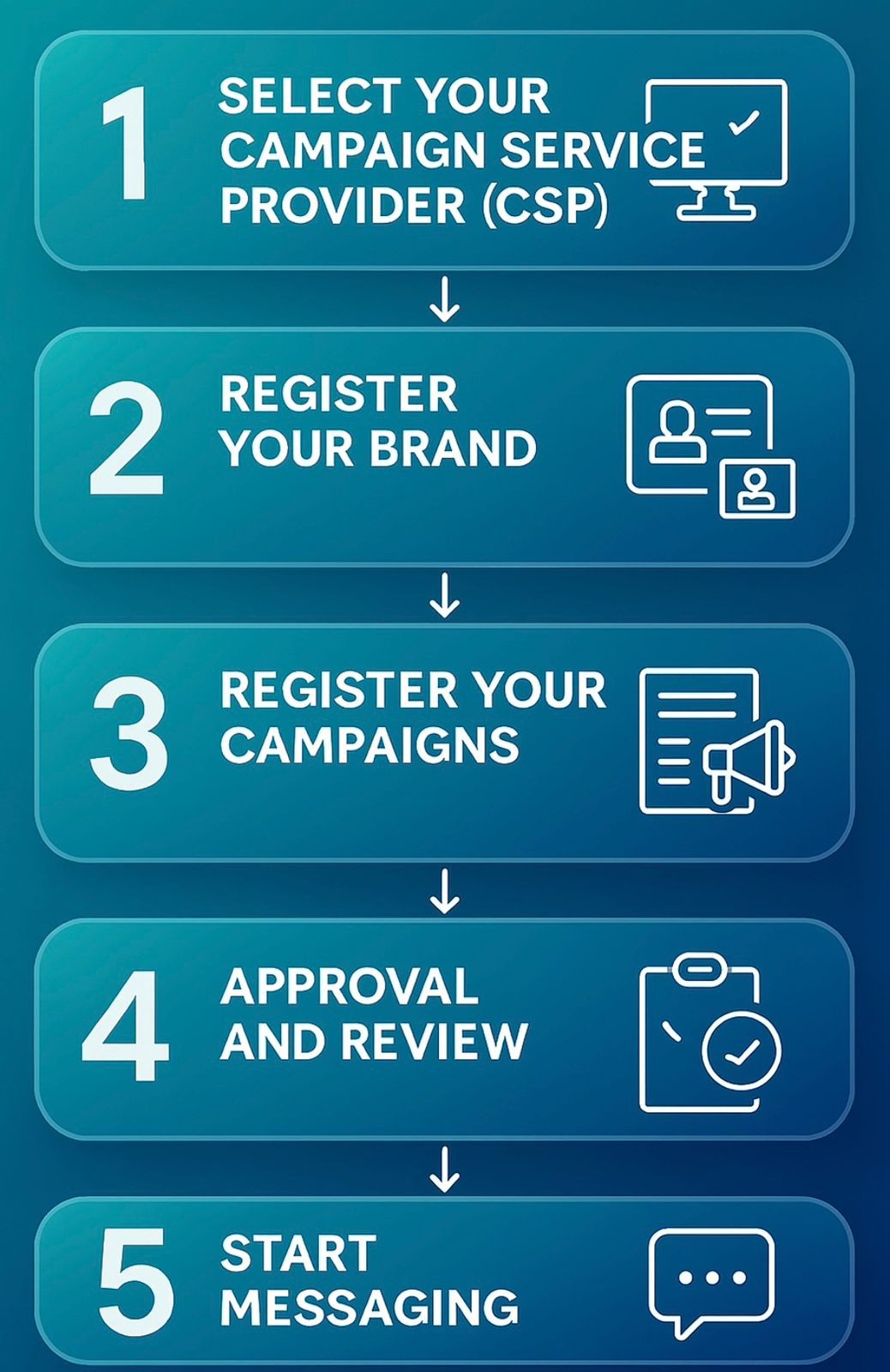
Once you’ve collected all the required details and documents, you can complete your 10DLC registration by following these steps:
Select Your Campaign Service Provider (CSP)
A CSP is the texting platform that handles your messaging campaigns and submits your registration to The Campaign Registry (TCR). If you choose a registered CSP like NXT, the process becomes faster and more streamlined.
Register Your Brand
Provide your business information, including your legal name, EIN, address, website, and contact details, so TCR can confirm your company is a verified and trustworthy sender.
Register Your Campaigns
Each campaign must have a clear purpose, known as a “use case.” If you plan to send different types of messages (e.g., customer service updates and marketing offers), each type will need its own registration. Along with your campaign details, you’ll also submit sample messages, proof of opt-in, and links to your SMS privacy policy and terms of service.
Approval and Review
After submission, TCR and mobile carriers will review your information to ensure compliance. Approval times are usually just a few days, but may vary depending on your campaign type and level of vetting required.
Start Messaging
Once approved, you’ll be assigned a campaign ID. With that, you can begin sending texts from your registered 10DLC number confidently and in full compliance.
Why 10DLC Registration is Important?
10DLC registration was introduced to bring more transparency to business texting and reduce spam across mobile networks. In the past, companies could send bulk messages from unverified numbers, which made it easier for scammers to pose as legitimate brands or flood people’s inboxes with unwanted texts. By requiring businesses to register their 10DLC numbers, carriers create a safer and more reliable messaging environment. This process helps to:
- Block fraudulent or deceptive text campaigns.
- Ensure businesses comply with customer opt-in rules.
- Maintain strong delivery rates for verified senders.
- Build trust in SMS as a professional and secure communication tool.
Staying Compliant with 10DLC Rules
After your 10DLC registration is approved, following carrier guidelines is essential to keep your messages deliverable and avoid penalties. Only send texts to people who have clearly opted in, and always provide an easy way to unsubscribe, for example, “Reply STOP to opt out.” Include links to your privacy policy and terms, ensuring they explain how you protect customer data (and do not state that you sell it to third parties). Never send texts before your registration is finalized, as unregistered traffic will be blocked. Stick to standard business hours to minimize complaints, and avoid any content related to Sex, Hate, Alcohol, Firearms, or Tobacco (SHAFT), as these topics are strictly prohibited under 10DLC rules.
10DLC registration is no longer optional, it’s the standard for secure, reliable, and compliant business texting in the U.S. By completing your brand and campaign registration, you protect your business reputation, improve message deliverability, and build trust with your audience. With a trusted Campaign Service Provider like NXT, the process becomes simple and stress-free. NXT not only manages your 10DLC registration from start to finish but also ensures your campaigns follow all carrier guidelines, keeping your messages compliant and effective. From verifying your brand to launching high-performing SMS campaigns, NXT gives you the tools and support you need to text with confidence.
Get started today with NXT — drive engagement and conversions with our messaging solutions. Enjoy powerful features like message automation, contact management, unlimited contacts, and more!